
What to Test During a 48-Hour Influencer Marketing Platform Trial
- Sanket Maheshwari
- 3 days ago
- 10 min read

Free trials are exciting. You're exploring, checking out features, watching demo videos, and testing searches.
It all looks good until a real campaign brief is put through it.
CultureX is built differently. The platform covers the full campaign cycle that starts with AI-powered creator discovery and ends with post-campaign reporting, all in one platform.
But knowing that and seeing it are two different things. Every team approaches an
influencer marketing platform trial differently. This guide simply walks you through the main workflows in a practical order so you can get the most from your CultureX trial With so much to unpack, it's easy to get overwhelmed by the sheer number of features the tool offers.
Here is exactly what to test across 48 hours and why each step matters.
Search with a Real Brief Instead of Broad Terms
Most of the time, users begin an influencer marketing platform trial by testing generic queries such as "pet influencer" or "food bloggers." This makes you think the database is comprehensive based on just numbers. On CultureX, test the four ways you can find influencers for your campaigns on "search influencer"
Global Search:
It is a primary discovery layer that covers all the major platforms like Instagram, YouTube, and TikTok across a database of 400M+ creators worldwide. You're going to have to spend some time with this module since the filter stack goes significantly deeper than follower count. It expands to bio keywords, mentions, audience credibility tier, engagement rate, location, age, gender, and contact availability.
The right way to test this is not with a broad category. Type a specific brief like "micro-influencers in Delhi for a skincare brand targeting women aged 22 to 35 with an engagement rate above 3%," and compare the results against a follower-count-only search for the same brief. The difference between those two lists is what the filter depth is actually worth.

To know more about influencer discovery go through, https://www.culturex.ai/post/ai-powered-influencer-discovery-the-future-of-creator-marketing
Content Inspiration: You can search specific content by brand names, usernames, or keywords to see what content is being posted around a specific topic or a brand. Use this brief to understand what formats are already performing in the category.

My Influencers: If you've interacted with a bunch of creators already, this is where you'll search them. These are categorised across buckets, searches, and campaigns, and you can filter them through status tags, those that are shortlisted, and so on. It makes it easy to see where each creator is across campaigns.
Directory: This is CultureX's own pre-vetted database of approximately 30,000 creators with verified contact details including email, WhatsApp, and phone numbers, organized by category.
Check Audience Data
Once there is a shortlist, you can test whether the platform shows high-quality data. This matters more than it might seem. According to Influencer Marketing Hub's Benchmark Report, influencer fraud accounts for $4.8 billion in wasted spend annually, and most of it is traceable to unvetted audience quality.
To test this on CultureX's Influenzer.ai, pull up two creators with a similar follower count in the same niche and compare their numbers side by side. The difference in audience quality between two creators is where more shortlisting decisions should be made.
Three things to check per creator at this stage:
Audience type breakdown: CultureX categorises each creator's audience into four categories: real people, mass followers, influencers, and suspicious accounts. You can identify them through behaviour pattern analysis rather than a simple split.
Social Score: The platform essentially summarises six parameters to create a social score: Audience credibility, engagement rate, six-month follower growth rate, average views-to-follower ratio, weekly post frequency, and total followers. You can use this feature to rank the shortlist by overall quality rather than any single metric.
Audience demographics: The tool doesn't just pull data from the creator's bio or location. We provide the age split, gender breakdown, and location from actual audience data at the profile level.
Content Safety Analysis: Test the safety analysis feature on at least one shortlisted creator before the brief goes out. It flags posts containing sensitive keywords across categories like alcohol, competitor mentions, and other brand risk areas. Since some of these flagged posts may be incidental, it's advisable to do a manual review of flagged content before proceeding further.

To know more,read: https://www.culturex.ai/post/social-listening-kpis-which-metrics-actually-matter-for-your-brand
CultureX's Influenzer.ai surfaces all of this per creator directly in the search result, before any shortlisting decision is made.
Build a Real Outreach Plan
Once you shortlist the influencers, test the outreach. You can create a Media Plan on CultureX that you can test the following way:
Creating a Media Plan: Go to "Buckets" for shortlisted creators and click "Create Media Plan." Select the platform and the specific deliverable type for that particular platform. It can be an image, video, reel, shorts, and so on. The Media Plan is built around the deliverables from the start.
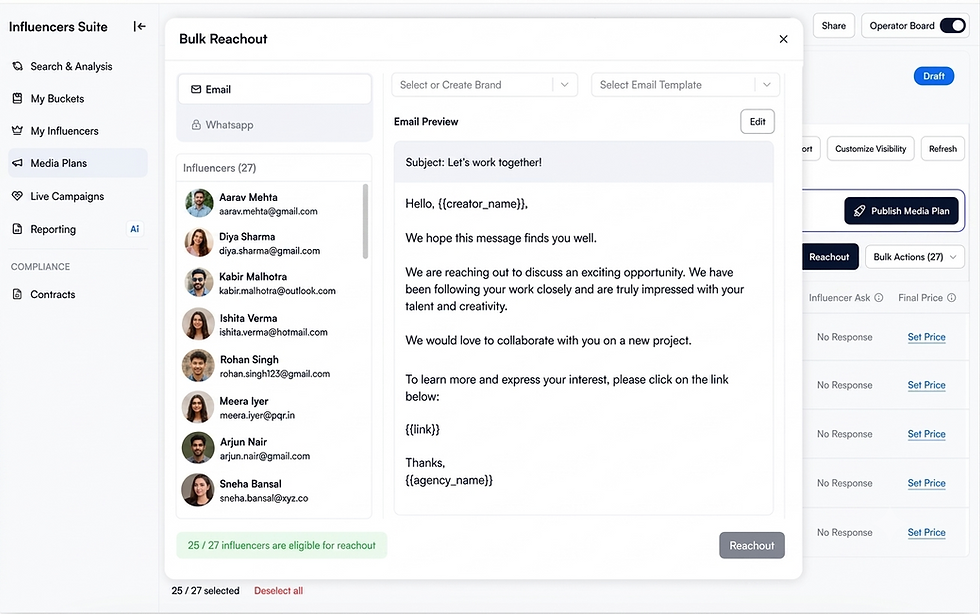
Reaching out at scale: Think of an email outreach tool that offers personalisation. This feature functions exactly like that. Select all creators and click "Bulk Reach Out."
CultureX sends outreach via email using a customisable template with personalisation fields such as creator name, agency name, and a unique form link. Each creator receives an email with their name auto-filled and a link to a response form where they can submit their pricing, availability, and any additional notes.
What happens after outreach goes out?
The response lands on the platform: When a creator fills in the form and submits their fee, that data populates directly on the Media Plan dashboard alongside the outreach history. The recipient, subject, sent time, and open status are all visible in one place.
Negotiation stays inside the platform: Creator responses, including commercials and notes, are visible directly on the dashboard without switching to a separate inbox or email thread.

To learn more about Influencer Outreach, Visit: https://www.culturex.ai/post/influencer-outreach-techniques-for-the-perfect-collaboration
Try Influenzer.ai's discovery and outreach workflow in a live trial. Start your free trial on CultureX.
Test the Approval Step
CultureX separates the operator and approver roles by design. The operator is typically the agency or internal marketing team that manages the Media Plan and the campaign, and the approver is the decision-maker. They can include the brand or client who simply need to review the campaigns.
Here is how the approval flow works inside CultureX:
Sharing the board: Once the Media Plan is finalised with influencer selections and agreed commercials, the operator copies the board link and shares it directly with the approver. For review and approval, the approver doesn't need a separate login.
What the approver sees: The approver lands on a clean dashboard view showing each shortlisted creator. From here, they can accept or drop each creator individually. If dropping, they can add a reason directly on the board.

For brands managing both roles: If the same user is both operator and approver, they can toggle between the two boards directly inside the platform without sharing an external link.
For more information, go through: https://www.culturex.ai/post/influencer-campaign-tracking-how-to-measure-performance-across-multiple-campaigns
See What a Report Looks Like Before a Campaign
A reporting module in an influencer marketing platform trial should do more than compile campaign metrics.
During your trial, check how CultureX simplifies analysis, surfaces actionable insights, and makes sharing results effortless.
Set up a report: Create a sample report by adding the brand, campaign budget, objectives, and reporting timeline to see how quickly reports can be configured.
Track campaign performance: You can test both Reach Mode and Focus Mode, add influencer content, and customise the metrics to ensure the dashboard highlights important KPIs.
Analyse results: Review engagement trends, create influencer groups for performance comparison, and run sentiment analysis to understand audience response beyond vanity metrics.
Share insights: Create a shareable report link and verify that clients or stakeholders can access campaign results easily. A reporting workflow should make collaboration simple, not require additional manual reporting.
PDF export: You can generate a PDF report directly from the account dashboard. It covers every metric visible on the platform in a formatted, downloadable file.
To know more about ROI of influencer campaigns, read: https://www.culturex.ai/post/how-to-measure-and-improve-influencer-marketing-roi-7-proven-strategies
Test the Social Listening Layer
Trial users evaluating an influencer platform do not realise that a social media monitoring tool is part of the package. This section is worth testing since it significantly affects the platform's value calculation.
Track.social is CultureX's own-account monitoring suite and serves as a social media monitoring tool, available for free during the trial. With this, you can
Connect a brand's own social account: Once you connect the brand's social account, you can check how quickly sentiment and comment classification start appearing. The speed of that first data pull is a useful indicator of how reliable the monitoring will be over time.
Run the Hashtag Analyzer on a branded or campaign hashtag: Enter a hashtag the brand has used recently and see post volume and sentiment update in real time. The combination of volume data and sentiment scoring in a single view is what sets this apart from a basic mention tracker.
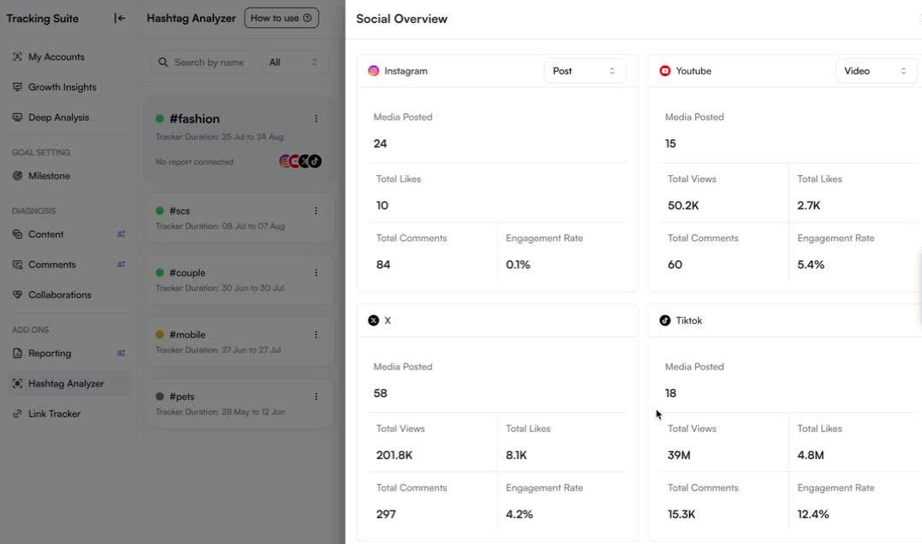
These tests confirm whether the social media monitoring tool is genuinely usable or just a name-only bundle.
For more information, tap on: https://www.culturex.ai/post/15-unique-ways-to-use-social-listening-to-make-an-impact-on-your-business
Competitor Tracking Before Committing Budget
In the last few hours of the influencer marketing platform trial, try to squeeze in competitor tracking.
Listenings.ai is CultureX's competitive intelligence suite. With this, you can run three tests:
Pull up a direct competitor and check their influencer activity: Enter a competitor's profile and see which creators they have worked with recently and what total views that activity generated. If a creator being considered for briefing is already mid-campaign for a rival brand, you can plan to take a new direction from here.
Analyse content trends: You can check what's trending, what's underperforming and use AI-powered content categorisation to determine recurring themes. You can export the data if needed.
Run a Market Benchmark comparison: See how the brand stacks up against competitors on engagement rate and Social Score side by side.

Check Comments Radar or Content Radar on a competitor's recent campaign: Audience sentiment and content themes from a competitor's live campaign are directly useful when building the next brief.

Explore Brand Insights :
Compare your brand with competitors: Use CultureX's Market Benchmark to see how your brand compares with competitors. You can check metrics like engagement rate, Social Score, and other performance indicators side by side.
Take a closer look at individual competitors: With Competitive Watch, you can analyse a specific competitor in more detail and understand how their social presence is performing over time.
See which creators competitors are working with: Instead of manually checking social media profiles, use Influencer Map to find creators who have recently collaborated with competing brands. It gives you a much clearer picture of their influencer partnerships.
Ask questions about your own brand data: The AI Brand Strategizer in CultureX lets you ask questions based on your brand's performance data. It helps you uncover insights and identify ideas that you can actually use while planning your next campaign
To know more about competitor analysis go through:https://www.culturex.ai/post/social-media-competitor-analysis-for-influencer-marketing-campaigns-a-complete-guide
Test the Community Suite
So far, every section covers what happens inside a single campaign. This one is worth testing even if the trial user is not ready to commit because it is the only platform that considers testing beyond a single campaign.
CultureX's Community Suite lets brands build a private, named influencer community directly on the platform. The test is simple: build a quick onboarding form, share the link, and confirm that a submitted response automatically populates the live dashboard.
This test confirms whether the brand's influencer roster can live within the platform permanently, rather than resetting to a spreadsheet after each campaign ends.
A creator database built inside the platform carries forward. Qualifying work, audience data, and campaign history stay attached to each creator profile rather than being rebuilt from scratch the next time a brief goes out.

To know more about community management, tap on:https://www.culturex.ai/post/what-is-community-management-and-how-ai-makes-it-scalable-for-brands
Wrapping Up: What a Good Trial Result Looks Like After 48 Hours
A platform subscription is not the expensive part of getting this decision wrong. The expensive part is running three campaigns on the wrong platform before realising it does not cover the full workflow.
The 48-hour trial on CultureX exists to surface that answer before any budget is committed. But only if the right things are tested.
A trial that confirms the search bar works and the UI looks clean has not been tested on the platform. It has tested the demo. The workflow questions, approvals, outreach, reporting, and competitor tracking only surface when something real is put through the platform under trial conditions.These features assess the fate of your campaigns.
Ready to run this test yourself? Start your free trial on CultureX.
FAQs
What should I test first during an influencer marketing platform trial?
Start with discovery. Run a real campaign brief through the search bar and compare the result against a filter-only search for the matching brief. If the platform cannot quickly arrive at a relevant shortlist using an actual brief, the rest of the workflow does not matter.
Is CultureX's social media monitoring tool free to try?
Yes. Track.social, CultureX's social media monitoring tool, is accessible within the trial. Connect a brand account and run the Hashtag Analyzer on a branded or campaign hashtag to see sentiment and post volume populate in real time.
Can I test competitor tracking during a trial, or is that a separate add-on?
Competitor tracking through Listenings.ai is available during the trial. You can pull up a direct competitor, check their recent influencer activity, and run a Market Benchmark comparison to see how the brand stacks up before committing to a subscription.
Do I need to involve my team during the trial, or can I test it alone?
Most of the sections mentioned can be tested alone. However, the approval step is worth testing with an actual external stakeholder, a client or manager, to confirm the frictionless access claim holds up in practice rather than just in a controlled internal test.
How long does it realistically take to see value from an influencer marketing platform?
The discovery and audience data sections show value within the first few hours. The approval and reporting tests show value within the first day. The Community Suite grows over time, so it is worth setting it up during the trial, even if the first campaign has not started yet.
Can I test the approval without my client having a platform login?
Yes. CultureX's Approver Board is designed for external stakeholders who do not have a platform account. The approver receives a link, reviews the shortlisted creators, and accepts or drops them without needing to sign up or log in.
What happens to my shortlists and data after the trial ends?
This is worth confirming directly with CultureX before the trial expires. The more important question to answer during the trial itself is whether the shortlists, outreach history, and community forms built over the 48 hours are worth preserving, because that is the clearest signal that the platform is worth continuing.


Comments